
The problem
Google Ads is very good at telling you when you could spend more. A campaign that could take more traffic gets flagged as “limited by budget”. A bid strategy that could chase more volume gets flagged as “limited by bid strategy target”. The recommendations page is a steady stream of the same idea in different words: raise this budget, loosen that target, add a few more broad match keywords, capture the demand you are apparently missing. Every one of those nudges points in the same direction, which is towards spending more money.
There is one thing it will never tell you, and it happens to be the thing most worth knowing: when a campaign is performing well above the target you set. If you told Google to aim for a £4 return on ad spend and the campaign is quietly delivering £7, no notification appears, Google raises no recommendation, and nothing in the interface so much as mentions it. The gap just sits there, month after month, and because the numbers all look healthy nobody goes looking for it.
That gap is usually costing you money. A target set below what the campaign can really achieve gives Smart Bidding permission to bid more aggressively than it needs to — higher costs per click, more marginal auctions — all to pull your return down towards the number you gave it. Where that is happening, you are paying more than you have to for the same sales. Where a tight budget has been holding it back, the waste has not started yet, but the permission is sitting there waiting — and, as we will come to, a change landing in August 2026 turns that latent problem into a live one.
Almost always, this traces back to a target someone set once and then left alone — picked when the campaign launched, or inherited from a previous agency, and never revisited. Meanwhile the account has improved, the margins have moved, and performance has pulled clear of the target, while the target itself has not budged. This check is five minutes to find out whether yours has quietly fallen out of date, and if you are paying Google more than you need to.
The five-minute check: your targets versus actual performance
The check is simply to read what each campaign is actually delivering against the target you asked it for. You are looking for campaigns comfortably beating their target — a higher ROAS, or a lower cost per acquisition, than the number sitting in the bid strategy.
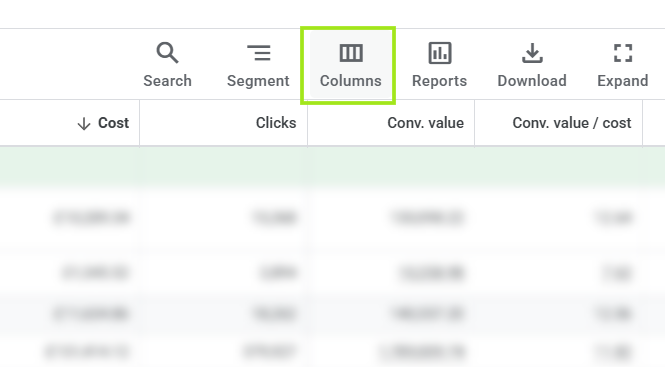
- Open your campaigns table and look at the bid strategy on each one. For a Target ROAS campaign your target is a percentage (a £4 return shows as 400%); for a Target CPA campaign it is a monetary figure. This is the number you told Google to aim for. If you cannot see it, edit your columns and add the Target ROAS and Target CPA columns — they are often not shown by default.
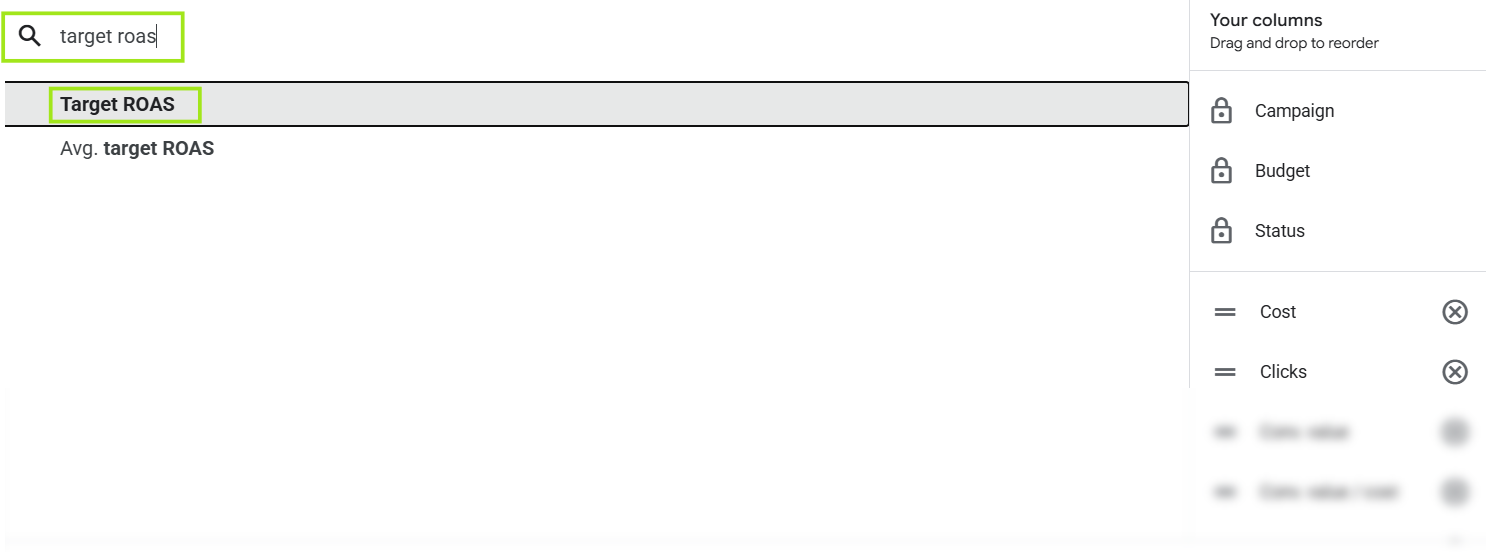
- Now add the columns that show what actually happened: Cost (usually already there), Conv. value, and Conv. value / cost (this is your actual campaign ROAS) — or Cost and Cost / conv. for a CPA campaign. Rearrange the columns so your actual ROAS (Conv. value / cost) or CPA (Cost / conv.) sits right next to your target, which makes the comparison easy to read at a glance.
- Set a sensible window — 30 days usually — and then check a longer one as well (90 days). A single strong week can flatter a campaign, and you do not want to raise a target on the back of one unusually good week or two. You are looking for a gap that holds up over time, not a lucky run.
- Flag every campaign — and every ad group, if you set targets at that level — where the actual result sits consistently and comfortably above the target. Those are the ones where your target has drifted out of line with reality.
Steps below
Adding your columns:
Add ROAS (Conv. value/cost):
Compare actuals versus your targets:
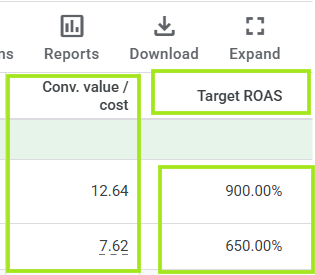
From this view you can see where you are likely paying Google more than you need to. Where your targets sit well below what your campaigns actually deliver, there is usually room to bring your CPCs down, lift your ROAS and keep more of the margin in the business.
In the example above from an audit – The campaigns are delivering a healthy ROAS but they are also delivering well above the targets. In this case, we don’t want to potentially choke volume (based on the specific clients’ goals) but we will nudge the targets slowly upwards towards what the campaigns are delivering – And importantly, do this slowly, and monitor very closely.
What to do: raise the target, in steps
Where a campaign is genuinely beating its target, the fix is to move the target up towards what the campaign is really doing — but deliberately, not in one leap. If your true, consistent return is £7 against a £4 target, resist the urge to jump straight to £7. Step it up — £4 to £5, let it settle, then £5 to £6 — and watch how each move lands before you make the next. Smart Bidding needs a little time to recalibrate after every change, and a series of small steps gives it that room where a single large one can jolt the campaign. If the target and the actual are already close, you can close the gap in one move; when they are far apart, step it up in stages.
What raising the target actually does is withdraw the permission to overspend. You are telling Google that £6 or £7 is the return you expect, so it stops bidding up into the expensive, marginal auctions it was entering to force the number back down to £4. Your costs per click ease off, the least efficient traffic falls away, and the spend you keep works harder. In money terms, that is the difference between paying for every sale you can technically get and paying for the sales that are actually worth having.
“But won’t a higher target just cut my sales?”
It may trim some volume, yes — and that is the point. The conversions you lose are the ones only ever coming in at a poor return, the ones a £4 target reached for and a £6 target leaves alone. You keep the profitable core and stop paying over the odds for the marginal extra. The honest caveat: if that extra volume is genuinely profitable, and you have the budget and the appetite to pursue it, then a lower target with more sales can be the right call — but that should be a decision made on purpose, not a setting nobody has looked at in a year. This check is aimed at the other kind: the target left too low by accident, not the one held low deliberately.
It’s just as possible that your won’t lose sales, and that you’ll only gain efficiency – Potentially getting more traffic (at a lower CPC) for the same budget. This is why it’s extremely important to monitor your campaigns, and monitor any changes you implement.
The change on 17 August that makes this urgent
This used to be a slow leak. From 17 August 2026 it becomes a faster one, because Google is changing how target-based bidding behaves. Until now, campaigns limited by budget have tended to overperform their targets — the budget cap kept spend down, so your actual return sat well above the number you set, and the too-low target didn’t do as much harm. A great many accounts are quietly in exactly that position.
Under the change, Google will steer those campaigns to perform more consistently towards the target you entered, rather than letting them drift above it. In plain terms: a campaign you have been quietly enjoying at a £7 return, against a £4 target you had forgotten about, will be pushed to spend more and deliver closer to that £4 — more cost, higher bids, and a real return dragged down towards the stale number in the box. Any campaign that has shown “limited by budget” at any point in the last twelve months falls within scope.
So the target you set and forgot stops being a ceiling you comfortably beat and becomes the level your performance is held to. If you only ever run this check once, run it before the middle of August, and give any changes a conversion cycle or two to settle first. You can read Google’s own note on the update here. This is crrently for campaigns “limited by budget” – It is worth reading and checking.
While you are in there: bids that were set once and left
The same fault — a number set at the start and never revisited — turns up in manual bids too, and brand campaigns are where we see it most. Plenty of advertisers run their brand terms on Manual CPC on purpose, and we are firmly in that camp: it keeps the cost of appearing on your own name under tight control, and Google has actually made Manual CPC easier to reach again in 2026 after years of steering everyone towards automation. The risk is not the strategy, it is leaving the maximum bid frozen at whatever it was on day one.
We took over an account recently where the brand campaign ran a maximum CPC of £0.30, set by the previous agency and left untouched. The Auction insights report (select the campaign or its keywords, then Campaigns > Insights and reports > Auction insights) showed very little competition on the brand term — few other advertisers, and no one seriously contesting the top spot — so there was no need to pay that much to hold it. We lowered the maximum CPC in small steps over a few weeks, watching impression share as we went, and the return on that brand campaign climbed from around £39 to over £200. The traffic barely moved; we had simply stopped paying for headroom we did not need.
There is a fair argument about whether to bid on your own brand at all, and it is worth having. Here the campaign earns its place because it lets us control the messaging people see against our own name, and once the bids were right the cost of doing so became very small. The point carries straight across from the targets check: a bid or a target is a lever you control, and its value comes from being set to today’s reality — not from being set once and trusted forever.
The bottom line
Read your actual performance against the target you set. Where a campaign is comfortably beating its target, that is not a pat on the back — it is a sign the target has fallen out of date, and very often a sign you are paying more than you need to for the results you are already getting.
Google will always tell you when you could spend more. It will never tell you when you could pay less. That second job belongs to whoever is actually managing the account, and it is one of the clearer examples of active management quietly earning its keep — a few minutes reading targets against reality, and steady money kept in the business rather than handed to the auction.
With the enforcement change arriving on 17 August, a target left too low stops being a quiet saving and starts being a real cost. Five minutes now is worth a good deal more than five minutes in September.