The gap between what you target and what triggers your ads
There is a difference between the keywords you are targeting and the searches people actually typed to trigger your ads. Most business owners assume these are the same thing. They are not, and the gap between them is where you can start to identify any issues within your account. It’s often a good starting point for a deeper investigation.
Google decides which searches your ads are relevant for. It is generous about this — deliberately so. Your ad for premium dog beds can be shown to someone searching “how to make a dog bed”, because Google can see the words line up even if the intent does not.
The search terms report is the list of what Google actually matched you to. It is the single most revealing report in the account, and in most of the accounts we audit, it often hasn’t been opened for months.
This check takes five minutes. It answers two questions at once: what are my ads matching to, and is anyone actually watching this account?
The five-minute check
You are looking for searches where lots of people saw your ad and hardly anyone clicked — because they read it and knew straight away it was not what they wanted. A handful still clicked, and you paid for those. But this isn’t really about wasted budget, its about how relevant, and activley managed are your campaigns?
- Go to Campaigns > Insights and reports > Search terms. (In older versions of the interface this sits under Keywords > Search terms.)
- Set the date range to the last 90 days. Thirty days is too short — individual search terms are low-volume, and you will not see the patterns.
- Filter to one campaign type at a time. Start with your Search campaigns. This matters — see the note below.
- Add a filter: Impressions greater than 100. This strips out the noise. A search term with four impressions and no clicks tells you nothing.
- Add a second filter: CTR less than 1%. You may need to expand this to less than 2% and then further to increase the range of traffic.
- Sort by Impressions, highest to lowest.
What is left is a list of the searches Google shows you for most often and that almost nobody clicks. Read the top twenty.
That is the whole exercise. It is usually a sobering few minutes.
One important note on the 1% threshold. A normal click-through rate on a Search campaign is somewhere around 4–9%, so anything under 1% or 2% is worth a look. But Shopping and Performance Max ads routinely sit below 1% on searches that are perfectly relevant — that is just how those formats behave. If you run this filter across a Shopping-heavy account you will flag half your normal traffic and give yourself a fright. For Shopping and Performance Max, drop the threshold to around 0.5% and treat it as a much softer signal.
But this isn’t a hard rule, its worth experimenting with different thresholds on your CTR filter.
Yes, you can do this for Performance Max now
Performance Max used to be a black box. It is not any more. Under the same Insights and reports > Search terms menu, change the dropdown to “Search terms and landing pages for Performance Max” and you will see the searches triggering your PMax ads.
Two things worth knowing:
- You can segment by ad format, which tells you whether a Shopping ad or a text ad was served for each search. That is a useful clue about whether the problem is your product feed or your ad copy.
- The PMax report only shows search terms above a certain volume threshold, so it is not a complete picture. It is a good deal better than nothing, which is what we had before.
What you’re actually looking for
Not individual bad searches. Patterns.
Google will always match you to some rubbish. It is the nature of the system, and chasing every single stray search term costs more in your time than it saves in your budget. Do not try to. What you want is the repeated theme — the same wrong idea showing up fifteen times in slightly different words.
Here’s a real example from an account we audited. The advertiser had done work at a number of well-known buildings, and Google had decided that was reason enough to match their ads to people searching for those buildings generically — looking for directions, opening hours, or anything else.
But this client’s product is highly specialised. The chance that any of those searchers were in the market for it was close to zero.
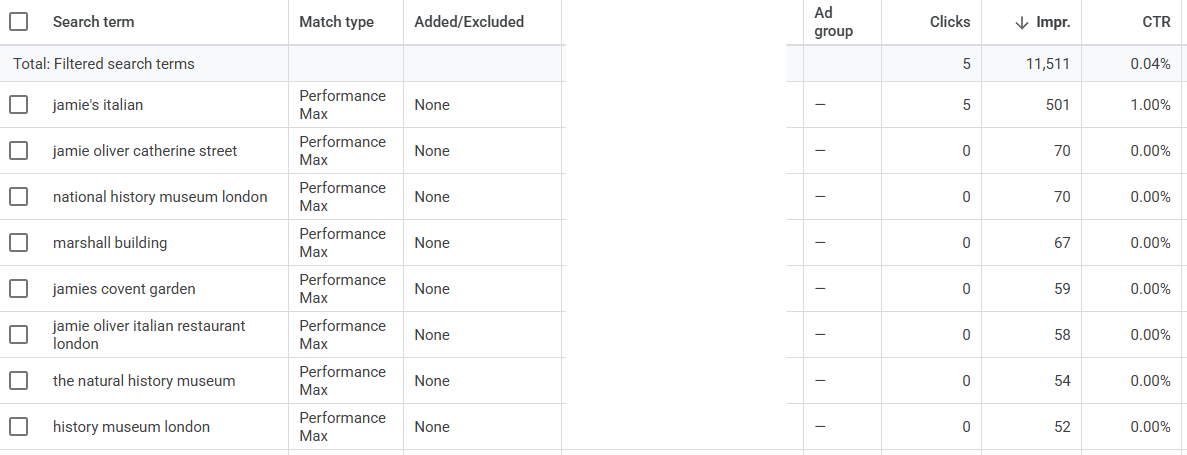
The volume was not enormous. That was not the point. It took a few minutes to find, it had been sitting there in plain sight, and it was the thread that unravelled the rest — an account with obvious oversights that nobody had been near in a long time.
The ones that come up again and again:
- The wrong noun entirely. You sell rubber seals for industrial machinery. Google shows your ads to people searching for seals at the zoo.
- Someone who wants to do it themselves. You sell garden furniture. Google matches you to “diy garden furniture”, “repairing furniture”, “garden patio”. They were never going to buy furniture specifically.
- Specific parts. You sell specific parts for a products, car parts, bicycle parts, washing machine parts, whatever this may be. But Google often matches either to the full product, not the part, or the brand which manufactures the product. We saw this within another account for Car Parts, where Google was matching thousands and thousands of ad impressions to the car make and nothing else.
- The brand name buried in your product title. Your feed says “Compatible with [Big Brand] X200”. Google reads that and shows your product to people searching for the Big Brand X200 itself. They want the original. They are not buying your compatible version.
- People looking for a job. “[Your product] jobs”, “[your brand] careers”. Surprisingly common, entirely worthless.
“But nobody clicked — so it didn’t cost me anything, did it?”
Some of it, no. You pay per click and not per impression, so a row with 3,000 impressions and no clicks has not taken money out of your account this quarter.
That is not really the point. The question is not what this list cost you. It is what this list is telling you.
Every irrelevant search on that page raises three questions, and none of them have comfortable answers:
- Why has this not been excluded already? It is sitting in the most obvious report in Google Ads, with hundreds of impressions, over ninety days. Anyone reviewing the account with any regularity would have seen it. If it is still there, the honest conclusion is that nobody has looked.
- Why is Google matching me to this in the first place? This report is Google telling you, plainly, what it thinks you sell. If what it thinks is wrong, then something you have given it is not as clear as you assume — your keywords are too loose, your match types are too broad, or your product titles are vague enough that Google has had to guess.
- Where else is that misunderstanding being applied? Google is not confused about your business only on the rows with no clicks. It is confused everywhere. The same wrong idea is out there right now on searches that are getting clicks — and those you are paying for. So always look at the search terms with low CTR, but also those with high volume and no conversions
There is a smaller, more mechanical cost too: Google watches how often people click your ads. A long history of showing up and being ignored makes it less confident in you, and that can quietly push up what you pay on the searches you actually want.
So no, a lot of this did not cost you anything directly. It is the cheapest diagnostic you will ever get on an advertising account — which is exactly why it is worth five minutes.
Low click-through rate doesn’t always mean irrelevant
This is where most people get it wrong, so slow down here. A low click-through rate has four possible causes, and only one of them is waste:
- The search was irrelevant. The one we have been hunting. Add it as a negative and move on.
- Your ad was in a poor position. The search was fine, but you were sitting at the bottom of the page where nobody looks. That is a bidding or quality problem, not a matching one.
- The search was relevant, but your offer wasn’t. Very common in Shopping. They saw your ad, saw your price was £15 higher than the shop next to you, and clicked elsewhere. That is a pricing, delivery or product problem — and it is arguably the most valuable thing on this list, because Google is telling you exactly where you are losing to competitors.
- The search is relevant, but the search was too generic. A search term such as tiles is very generic, and often google may not match products and so you have a low CTR.
The test is simple: read the search term and ask whether a real person typing that would ever buy from you. If no, it is waste. If yes, and they still did not click, that is a different problem — and a more interesting one.
What to do about it — the mop and the plumbing
There are two jobs here, and almost everybody only does the first one.
The mop: add negative keywords
Tick the box next to the irrelevant search terms and add them as negative keywords. You can do this straight from the report. Two things to be careful about:
- Add them at the right level. A search term that is irrelevant to your entire business belongs on an account-level negative list. One that is only wrong for a particular campaign should be added there, not everywhere.
- Do not block yourself. Before you add “cheap” as a negative, check you do not have a converting product line called “cheap storage boxes”. This happens more than you would think.
Negative keywords in Performance Max used to require emailing your Google rep. They do not any more — you can now apply them at campaign level as well as account level. If your agency still tells you PMax negatives are not possible, that is out of date.
The plumbing: work out why it happened
This is the part that actually matters. Negatives are infinite — you will be adding them forever. The reasons Google is matching you badly are usually about five things:
- Broad match with no guardrails. Broad match is not a mistake, but running it without a serious negative keyword framework behind it is.
- Vague or stuffed product titles. If your feed title is “Premium Quality Heavy Duty Storage Solution Box Set”, Google has to guess what you sell. It will guess badly. Clear, boring, accurate titles match better than clever ones.
- Search themes drawn too wide. In Performance Max, a loose search theme gives Google permission to roam.
- No brand exclusions. Worth checking separately.
- Everything in one campaign. When different products with different intent share a budget, Google has no way of knowing which searches belong where.
- Google taking too many liberties – Often we just see that Google will trigger your ads for a much terms often only vaguely related to your products. With the introduction of AI Max and Performance Max – It’s even more important to check these reports.
Fixing one of these removes a hundred future negatives. Adding a hundred negatives fixes none of these.
You can read more on how Google matches search terms here. Even on Google’s own article there, they show some “broad” matching, however the truth in your account is often much broader than the examples.
The bottom line
Run the check. Read the top twenty or so. Look for patterns, not individual terms.
Then look at the dates. If the same irrelevant pattern is still running at hundreds of impressions across the last 90 days, that is not a matching problem — that is a maintenance problem. Somebody would have caught it on any routine review of the account.
Every account has some waste in it. That is normal, and chasing it all is a false economy. What is not normal is waste that has been sitting there, visible, in the most obvious report in Google Ads, for six months.